Skip to content

Make Selenium Easy

And Keep It That Way

  • Home
  • Share
  • Toggle search form

Postman Tutorial Part 46 – Accessing Data Variables in Pre-request and test scripts

Posted on 03/21/2025 By admin

We have already learnt to create parameterized request body by reading data from a CSV and JSON file. If you have not gone through them yet, you must go now.

Creating parameterized request by reading data from a CSV

Creating parameterized request by reading data from a JSON

Achieving Data driven testing using CSV in Postman

Achieving Data driven testing using JSON in Postman

We can store and use data from csv and json for validation or expected results as well. For this we must be able to read those data (variables) in scripts. We will going to learn the same in this post.

Postman Sandbox provides an API reference named “pm“. “pm.iterationData” API can be used to play around data variables. This iterationData object contains data from the data file provided during a collection run.

You must be thinking that there will be multiple rows in csv or JSON Objects in JSON, so which row data it will return? It is a valid question. We know that mostly CSV or JSON data files are used to achieve data driven testing of API in Postman. Each row is considered as an iteration. So iterationData Object always contains data from currently executing iteration row.

To get value of a data variable, we need to use get() method as below:-

pm.iterationData.get(variableName)

Example:-

Let’s add below codes in to Pre-request Script and Tests for API used in Creating parameterized request by reading data from a CSV . You can use example of JSON as well.
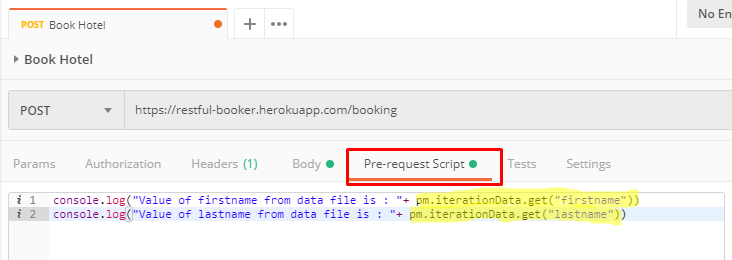
Let’s run above API using data file with one row and multiple rows :-

For data file with multiple rows:-

Please note all above concepts are same for both CSV and JSON data files.

You can find all Selenium related post here.
You can find all API manual and automation related posts here.
You can find frequently asked Java Programs here.

Uncategorized

Post navigation

Previous Post: REST Assured Tutorial 50 – How to set Content-Type for request in Rest Assured
Next Post: java programs

Related Posts

PostmanAppDownload – Make Selenium Easy Uncategorized
image – Make Selenium Easy Uncategorized
REST Assured Tutorial 4 – Let’s Write First GET REST Assured Test Uncategorized
getAttribute Uncategorized
OAuth 2.0 Uncategorized
implicitwait – Make Selenium Easy Uncategorized

Recent Posts

  • Getting Started with Selenium 4: What Is New and How to Upgrade from Selenium 3
  • Manual Testing
  • Baby Steps To Become Efficient Selenium-Java Automation Tester
  • Features of Selenium 4.0.0 Release – Java Binding
  • Part 1: Handling Drop-down Created Using SELECT Tag In Selenium

Recent Comments

No comments to show.

Archives

  • April 2026
  • April 2025
  • March 2025
  • February 2025
  • January 2025
  • December 2024
  • November 2024
  • October 2024
  • September 2024
  • August 2024
  • April 2024
  • March 2024
  • February 2024
  • December 2023
  • October 2023
  • August 2023
  • November 2022
  • September 2022
  • August 2022
  • July 2022
  • May 2022
  • March 2022
  • October 2021
  • April 2021
  • March 2021
  • January 2021
  • December 2020
  • October 2020
  • September 2020
  • August 2020
  • June 2020
  • May 2020
  • April 2020
  • March 2020
  • February 2020
  • January 2020
  • December 2019
  • November 2019
  • October 2019
  • September 2019
  • August 2019
  • May 2019
  • December 2018
  • November 2018
  • October 2018
  • September 2018
  • August 2018
  • July 2018
  • January 2018

Categories

  • Getting Started
  • Uncategorized

Copyright © 2026 Make Selenium Easy.

Powered by PressBook Masonry Dark