This selenium scripting question is asked to beginners and intermediate-level professionals. The detailed problem statement is as below:-
- Launch Google Home page URL.
- Click on “Google Apps” Icon.
- Print all product names.
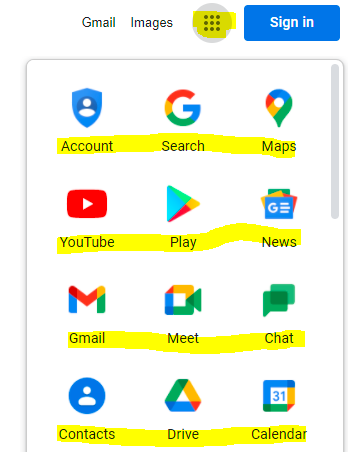
This looks simple but it has multiple Selenium concepts involved and that makes this question perfect for interviews.
Did you know that I have started a YouTube channel as well and I need your support to make it successful. Please do watch content then comment, like, share, and obviously subscribe.
- Locating SVG elements in Selenium WebDriver.
- Switch to IFrame in Selnium WebDriver.
- Locating multiple web elements
- Little complex Xpaths
- Stream Apis in Java
package General; import java.util.List;
import org.openqa.selenium.By;
import org.openqa.selenium.WebDriver;
import org.openqa.selenium.WebElement;
import org.openqa.selenium.chrome.ChromeDriver;
import org.testng.annotations.Test; import io.github.bonigarcia.wdm.WebDriverManager; public class GetAllGoogleAppNames { @Test public void navigateThroughTabsAndGetTitle() { // Launching browser WebDriverManager.chromedriver().setup(); WebDriver driver = new ChromeDriver(); // Loading Google driver.get("https://www.google.com/"); // Google Apps is a SVG element. There are multiple svg element so I used multiple attributes. driver.findElement(By.xpath("//*[name()='svg' and @class='gb_We']")).click(); // App names are shown in under an IFrame driver.switchTo().frame(driver.findElement(By.xpath("//iframe[@role='presentation']"))); // Locating all app names. XPath is tricky as we can not use their values as they are dynamic List allMenus = driver.findElements(By.xpath("//div[@jsname and @jsaction]//li/a/span")); // Printing all app names Without stream for(WebElement menu : allMenus) { System.out.println(menu.getText()); } System.out.println("===================================================="); // With stream apis allMenus.stream().map(WebElement::getText).forEach(System.out::println); //quitting driver driver.quit(); } }
Account
Search
Maps
YouTube
Play
News
Gmail
Meet
Chat
Contacts
Drive
Calendar
Translate
Photos
Duo
Shopping
Docs
Sheets
Slides
Books
Blogger
Hangouts
Keep
Jamboard
Earth
Collections
Arts and Culture
Google Ads
Podcasts
Travel
Forms
====================================================
Account
Search
Maps
YouTube
Play
News
Gmail
Meet
Chat
Contacts
Drive
Calendar
Translate
Photos
Duo
Shopping
Docs
Sheets
Slides
Books
Blogger
Hangouts
Keep
Jamboard
Earth
Collections
Arts and Culture
Google Ads
Podcasts
Travel
Forms
You can subscribe to my YouTube channel RetargetCommon to learn from video tutorials.
If you have any doubt, feel free to comment below.If you like my posts, please like, comment, share and subscribe.#ThanksForReading
#HappyLearning