Skip to content

Make Selenium Easy

And Keep It That Way

  • Home
  • Share
  • About Us
  • Toggle search form

Handling JQuery Dialog Box In Selenium Webdriver

Posted on 02/08/2025 By admin

Hello Folks,

In this post we will see how to handle JQuery dialog box in selenium webdriver.

Sample html code to create a JQuery dialog box:

JqueryDialogBox.html:

If you open above html code in browser and click on button, you will see a dialog box as below:
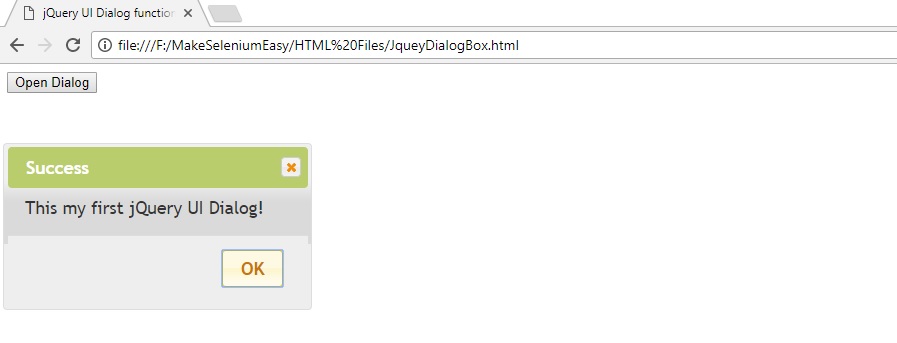
You can inspect this dialog box. There is no need to switch to it. Just locate desired web element and perform actions. See example below:

If you have any doubt, feel free to comment below. If you like my posts, please like, comment, share and subscribe. #ThanksForReading

#HappySelenium

Uncategorized

Post navigation

Previous Post: Git Tutorial 17 – What Is Head In Git?
Next Post: Frequently Asked Java Programs: 33 – Insert a String into Another String at given index

Related Posts

API Testing Tutorial Part 9 – Difference Between REST and RESTFul API Uncategorized
Log4j2 Tutorial 3 – Setup Console Appender Using XML Configuration File Uncategorized
Css – Make Selenium Easy Uncategorized
TestNG Tutorials 40: Groups of Groups or MetaGroups in TestNG Uncategorized
Interview Experience at Publicis Sapient Bangalore for Selenium & API Testing Profile – Jan– 2020 Uncategorized
Why And How Should We Terminate Browser Driver Executable File In Selenium WebDriver Uncategorized

Recent Posts

  • Common Selenium Exceptions and How to Fix Them
  • How to Use WebDriverWait and Expected Conditions Effectively
  • Implicit Wait vs Explicit Wait vs Fluent Wait in Selenium
  • Handling Text Fields, Text Areas, and Input Forms in Selenium
  • How to Handle Checkboxes and Radio Buttons in Selenium

Recent Comments

No comments to show.

Archives

  • August 2026
  • July 2026
  • June 2026
  • May 2026
  • April 2026
  • April 2025
  • March 2025
  • February 2025
  • January 2025
  • December 2024
  • November 2024
  • October 2024
  • September 2024
  • August 2024
  • April 2024
  • March 2024
  • February 2024
  • December 2023
  • October 2023
  • August 2023
  • November 2022
  • September 2022
  • August 2022
  • July 2022
  • May 2022
  • March 2022
  • October 2021
  • April 2021
  • March 2021
  • January 2021
  • December 2020
  • October 2020
  • September 2020
  • August 2020
  • June 2020
  • May 2020
  • April 2020
  • March 2020
  • February 2020
  • January 2020
  • December 2019
  • November 2019
  • October 2019
  • September 2019
  • August 2019
  • May 2019
  • December 2018
  • November 2018
  • October 2018
  • September 2018
  • August 2018
  • July 2018
  • January 2018

Categories

  • Getting Started
  • Locators and Elements
  • Uncategorized
  • Waits and Synchronization

Copyright © 2026 Make Selenium Easy.

Powered by PressBook Masonry Dark