Skip to content

Make Selenium Easy

And Keep It That Way

  • Home
  • Share
  • Toggle search form

TestNG Tutorials 39: Run Only Test From a TestNG Class Without Using TestNG XML?

Posted on 03/16/2025 By admin

Hello Folks,

Suppose you have created a testng class which has many @Test annotated methods say 10 test methods. You may need to run only one test out of 10 for debug/verify etc. Generally I see people will comment “@Test” annotations or use testng.xml to include required test method using include or exclude tags.

There are some very simple ways to achieve this. I will discuss those ways here:

  1. Just select test method name and click on run method.
  2. Use run configuration.

Just select test method name and click on run method:

Refer below video to understand how to do this (Click on Full Screen icon):

Steps to follow:

  1. Select a test method from TestNG class.
  2. Hit “Run” button or press Fn+f9 button.

TestNG Class:

Output: Selected test method will be run only.

Use run configuration:

Refer below video to understand how to do this:

Steps to follow:

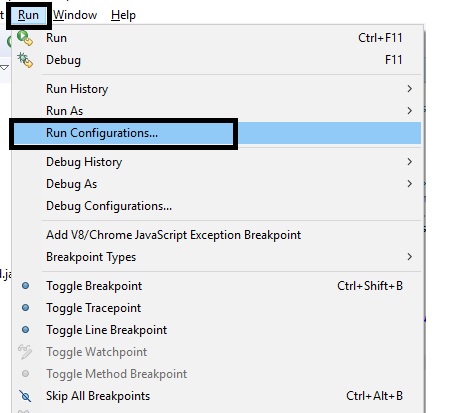
  1. Navigate to Run-> Run Configuration.

    2. Select your project in “Project” field using browse button.

3. Select TestNG class name in “Class” field using browse button.

4. Select Method name in “Method” field using browse button. When you click on browse button, all methods from above selected class will be shown.

5. Click on “Apply” and “Run”.

You will observe only selected method has run. This is very helpful while creating scripts or bug fixes. Hope it will help you.

More about TestNG in upcoming posts. Stay tuned.

If you have any doubt, feel free to comment below. If you like my posts, please like, comment, share and subscribe. #ThanksForReading

#HappySelenium

Uncategorized

Post navigation

Previous Post: StaleElementReferenceException – Element’s “Reference” Stales – Get New Reference Of Element
Next Post: chrome

Related Posts

June 8, 2018 – Make Selenium Easy Uncategorized
Selenium Quiz Uncategorized
image – Make Selenium Easy Uncategorized
Git Tutorial 1 – What is Version Control System? Uncategorized
Validate The Validation You Do – isEnabled() & isSelected() Methods in Selenium WebDriver – Make Selenium Easy Uncategorized
How To Solve – IllegalArgumentException: Keys to send should be a not null CharSequence Uncategorized

Recent Posts

  • Getting Started with Selenium 4: What Is New and How to Upgrade from Selenium 3
  • Manual Testing
  • Baby Steps To Become Efficient Selenium-Java Automation Tester
  • Features of Selenium 4.0.0 Release – Java Binding
  • Part 1: Handling Drop-down Created Using SELECT Tag In Selenium

Recent Comments

No comments to show.

Archives

  • April 2026
  • April 2025
  • March 2025
  • February 2025
  • January 2025
  • December 2024
  • November 2024
  • October 2024
  • September 2024
  • August 2024
  • April 2024
  • March 2024
  • February 2024
  • December 2023
  • October 2023
  • August 2023
  • November 2022
  • September 2022
  • August 2022
  • July 2022
  • May 2022
  • March 2022
  • October 2021
  • April 2021
  • March 2021
  • January 2021
  • December 2020
  • October 2020
  • September 2020
  • August 2020
  • June 2020
  • May 2020
  • April 2020
  • March 2020
  • February 2020
  • January 2020
  • December 2019
  • November 2019
  • October 2019
  • September 2019
  • August 2019
  • May 2019
  • December 2018
  • November 2018
  • October 2018
  • September 2018
  • August 2018
  • July 2018
  • January 2018

Categories

  • Getting Started
  • Uncategorized

Copyright © 2026 Make Selenium Easy.

Powered by PressBook Masonry Dark