IllegalArgumentException is another frequently faced exception in Selenium WebDriver specially by beginners. So in his post, I will explain a reason of occurrence of this exception.
If you try to type something in to an input box and input string is either null or length of input string is zero, sendKeys() will throw an exception as – IllegalArgumentException: Keys to send should be a not null CharSequence.
If you see the implementation of sendKeys() method in RemoteWebElemen() then you can check that there are some conditions specified before sending keys to WebElement.
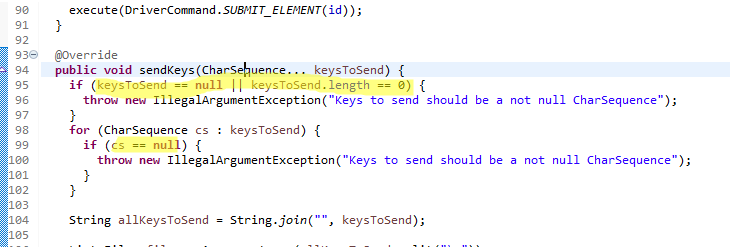
If the input string is null or length of input string is zero then throw an exception called IllegalArgumentException with the message Keys to send should be a not null CharSequence.
package BasicSeleniumConcepts;

import org.openqa.selenium.By;
import org.openqa.selenium.WebDriver;
import org.openqa.selenium.chrome.ChromeDriver;
import org.testng.annotations.Test;

import io.github.bonigarcia.wdm.WebDriverManager;

public class IllegalArgumentExceptionExample {

        @Test
        public void googleSearch1() {
                WebDriverManager.chromedriver().setup();
                WebDriver driver = new ChromeDriver();
                driver.get("https://www.google.com");
                // Typing null search keyword
                String inputString = null;
                driver.findElement(By.name("q")).sendKeys(inputString);
        }

        @Test
        public void googleSearch2() {
                WebDriverManager.chromedriver().setup();
                WebDriver driver = new ChromeDriver();
                driver.get("https://www.google.com");
                // no passing any value in sendKeys
                driver.findElement(By.name("q")).sendKeys();
        }
}
You will get above exception for both @Test method above.
There is a small catch. Guess the output if we pass value in sendKeys as :-
@Test
public void googleSearch3() {
        WebDriverManager.chromedriver().setup();
        WebDriver driver = new ChromeDriver();
        driver.get("https://www.google.com");
        // no passing any value in sendKeys
        driver.findElement(By.name("q")).sendKeys("");
}
You will NOT get IllegalArgumentException- Keys to send should be a not null CharSequence as “” is considered as input “” i.e. with length as 1.
You can download/clone above sample project from here.
If you have any doubt, feel free to comment below.If you like my posts, please like, comment, share and subscribe.#ThanksForReading
#HappyLearning