Launching a web browser and loading a URL in opened browser are basic steps to get started with Selenium WebDriver. We have already learnt to launch different browsers using Selenium WebDriver. In this post, we will see how can we load a URL in browser.
In this post we will learn below topics:
- Loading a URL through get() method.
- Loading a URL using to() method.
- Difference between get() and navigate()
get() method is used to load a web page or URL in a browser using an HTTP POST operation i.e.
POST /session/:sessionId/url
where :-
:sessionId – ID of the session to route the command to. url – {string} The URL to navigate to passed as body.
Implementation of get() method is in RemoteWebDriver class which creates a POST request internally (execute() method) and you have no need to worry abut creating an API request explicitly.
Method signature is as below :-
void get(java.lang.String url)
Points to know about get():
- get() method is declared in WebDriver interface.
- get() method is implemented in RemoteWebDriver class which construct an HTTP POST request.
- get() method returns void.
- get() method takes an argument of type String which is a URL.
- It loads a new web page in the current browser window.
- It blocks the execution of next statement till web page is loaded completely.
- If you try to open a URL without HTTP or HTTPS i.e. driver.get(“www.facebook.com”);) then get() method will throw an exception as “org.openqa.selenium.InvalidArgumentException: invalid argument“. This is common mistake done by beginners.
- You can load a URL without mentioning WWW i.e. http://facebook.com. It will not give any exception. This was asked to me in interview.
- There may be a Page Load Timeout which depends upon browser. For chrome, page load time out is shown as 300000 seconds as shown below :-
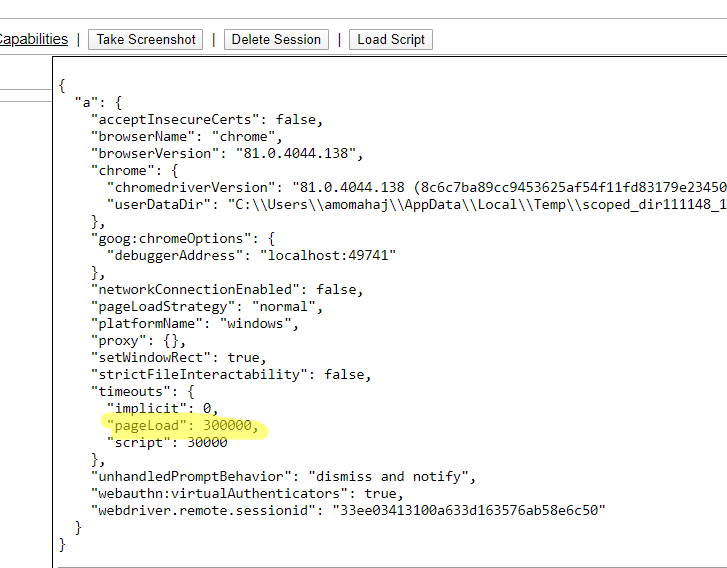
10. We can set page load time using pageLoadTimeout( long arg0, TimeUnit arg2 ) method.
12. You can go back and forward using interface Navigation method as browser history is maintained. You can use get() multiple times in a program.
package BasicSeleniumConcepts;

import org.openqa.selenium.WebDriver;
import org.openqa.selenium.chrome.ChromeDriver;

import io.github.bonigarcia.wdm.WebDriverManager;

public class LoadURLUsingGet {

        public static void main(String[] args) {

                WebDriverManager.chromedriver().setup();
                WebDriver driver = new ChromeDriver();
                System.out.println("Loading URL one by one ........");
                driver.get("http://facebook.com");
                System.out.println("Current title is : " + driver.getTitle());
                driver.get("http://google.com");
                System.out.println("Current title is : " + driver.getTitle());
                driver.get("http://flipkart.com");
                System.out.println("Current title is : " + driver.getTitle());
                System.out.println("Going back....");
                driver.navigate().back();
                System.out.println("Current title is : " + driver.getTitle());
                driver.navigate().back();
                System.out.println("Current title is : " + driver.getTitle());
                System.out.println("Going forward......");
                driver.navigate().forward();
                System.out.println("Current title is : " + driver.getTitle());
                driver.navigate().forward();
                System.out.println("Current title is : " + driver.getTitle());

        }
}
Starting ChromeDriver 81.0.4044.138 (8c6c7ba89cc9453625af54f11fd83179e23450fa-refs/branch-heads/4044@{#999}) on port 23181
Only local connections are allowed.
Please protect ports used by ChromeDriver and related test frameworks to prevent access by malicious code.
May 23, 2020 1:30:53 PM org.openqa.selenium.remote.ProtocolHandshake createSession
INFO: Detected dialect: W3C
Loading URL one by one ……..
Current title is : Facebook – log in or sign up
Current title is : Google
Current title is : Online Shopping Site for Mobiles, Electronics, Furniture, Grocery, Lifestyle, Books & More. Best Offers!
Going back….
Current title is : Google
Current title is : Facebook – log in or sign up
Going forward……
Current title is : Google
Current title is : Online Shopping Site for Mobiles, Electronics, Furniture, Grocery, Lifestyle, Books & More. Best Offers!
WebDriver interface has a method “navigate()” which returns a type Navigation which is an inner interface in WebDriver interface. Navigation interface is an abstraction allowing the driver to access the browser’s history by explicit methods and to navigate to a given URL.
This Navigation interface consists of below methods :-
// Move back a single "item" in the browser's history
void back();
// Move a single "item" forward in the browser's history. Does nothing if
we are on the latest page viewed.
void forward();
// Load a new web page in the current browser window. Similar to get() method
void to(String url);
// Overloaded version of to(String url) that makes it easy to pass in a URL
void to(URL url);
//Refresh the current page
void refresh();
There is no difference between to() and get() methods as to() method internally calls get() method itself. Both methods will block execution of next line until page load is complete or timeout. Both methods holds browsing history. Navigation interface provides you direct methods to access browse history.
package BasicSeleniumConcepts;

import org.openqa.selenium.WebDriver;
import org.openqa.selenium.chrome.ChromeDriver;

import io.github.bonigarcia.wdm.WebDriverManager;

public class LoadURLUsingNavigate {

        public static void main(String[] args) {

                WebDriverManager.chromedriver().setup();
                WebDriver driver = new ChromeDriver();
                System.out.println("Loading URL one by one ........");
                driver.navigate().to("http://facebook.com");
                System.out.println("Current title is : " + driver.getTitle());
                driver.navigate().to("http://google.com");
                System.out.println("Current title is : " + driver.getTitle());
                driver.navigate().to("http://flipkart.com");
                System.out.println("Current title is : " + driver.getTitle());
                System.out.println("Going back....");
                driver.navigate().back();
                System.out.println("Current title is : " + driver.getTitle());
                driver.navigate().back();
                System.out.println("Current title is : " + driver.getTitle());
                System.out.println("Going forward......");
                driver.navigate().forward();
                System.out.println("Current title is : " + driver.getTitle());
                driver.navigate().forward();
                System.out.println("Current title is : " + driver.getTitle());

        }
}
Starting ChromeDriver 81.0.4044.138 (8c6c7ba89cc9453625af54f11fd83179e23450fa-refs/branch-heads/4044@{#999}) on port 19532
Only local connections are allowed.
Please protect ports used by ChromeDriver and related test frameworks to prevent access by malicious code.
May 23, 2020 2:10:03 PM org.openqa.selenium.remote.ProtocolHandshake createSession
INFO: Detected dialect: W3C
Loading URL one by one ........
Current title is : Facebook – log in or sign up
Current title is : Google
Current title is : Online Shopping Site for Mobiles, Electronics, Furniture, Grocery, Lifestyle, Books & More. Best Offers!
Going back....
Current title is : Google
Current title is : Facebook – log in or sign up
Going forward......
Current title is : Google
Current title is : Online Shopping Site for Mobiles, Electronics, Furniture, Grocery, Lifestyle, Books & More. Best Offers!
Difference between get() and navigate():
- Return type of get() is void while return type of navigate() is a Navigation interface which allows you use other methods.
- Using navigate() you get direct methods of Navigation interface to access browsing history by using back() and forward() methods. You can navigate to a URL as well as you can refresh current window.
- There is no difference in internal implementation of get() and to() as to() method calls get() method internally.
I have explained difference in detailed here.
You can download/clone above sample project from here.
If you have any doubt, feel free to comment below.If you like my posts, please like, comment, share and subscribe.#ThanksForReading
#HappyLearning