Skip to content

Make Selenium Easy

And Keep It That Way

  • Home
  • Share
  • About Us
  • Toggle search form

Git Tutorial 31 – How To Retrieve Deleted But Not Committed File in Git?

Posted on 03/16/2025 By admin

As a part of GIT Tutorials End To End, we will learn about retrieving a deleted but not committed file in Git.

I will expect that you are aware of the basic concepts and commands of GIT. But if you are a beginner in GIT then I strongly recommend you to refer GIT Basic Commands and Concepts section on my blog first.

Deleting a file is not a rare action while working on a project but sometimes it might be accidental. There are multiple scenarios in this but we will focus on retrieving a deleted file but the result is yet to be committed. Let’s do this in action to understand better.

I have created a git project and added and committed a file. This project is not linked to any remote repository i.e. all changes are local.
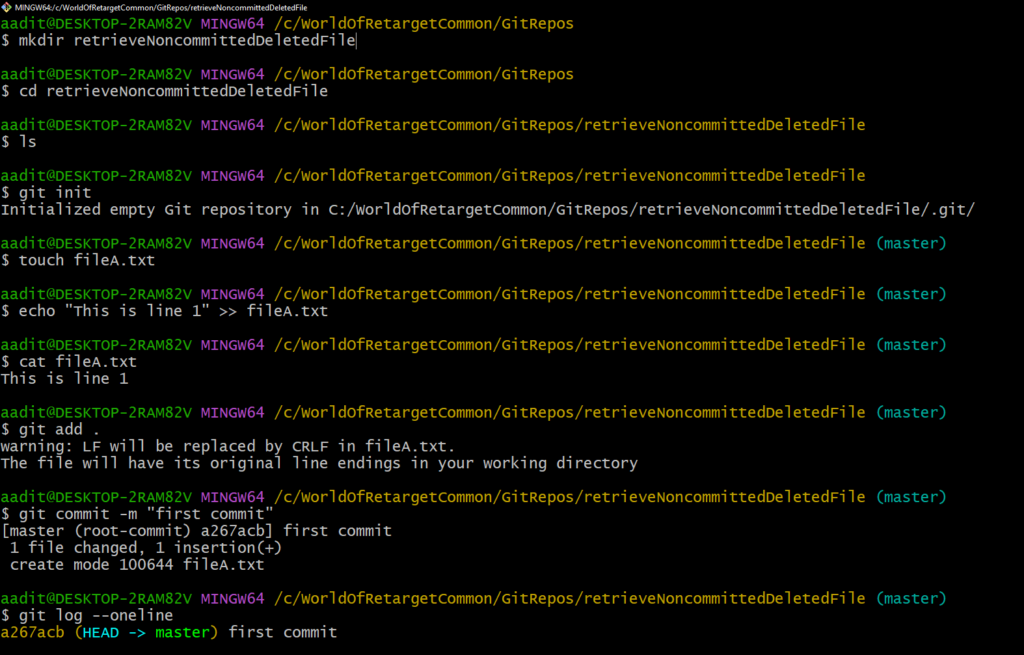
Now we will delete the file “fileA.txt” but we will not commit this action.
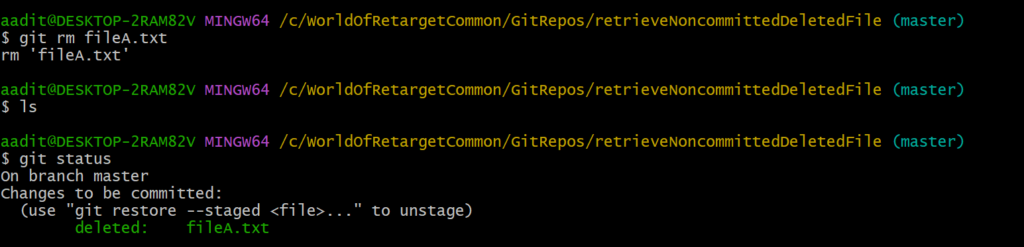
In this scenario, we can retreieve deleted file from last commit. We know that HEAD will point to the last commit. So we can use the below command –

git checkout HEAD
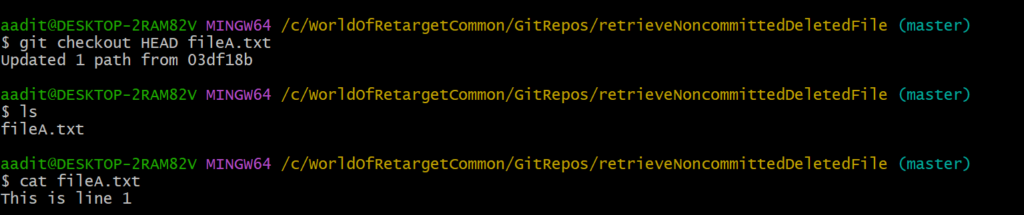
As you can see in the above screenshot we have recovered deleted file. But what have we done here? We have retrieved the file from history i.e. commit. What if we have made some changes to the file after the last commit? Let’s see below –
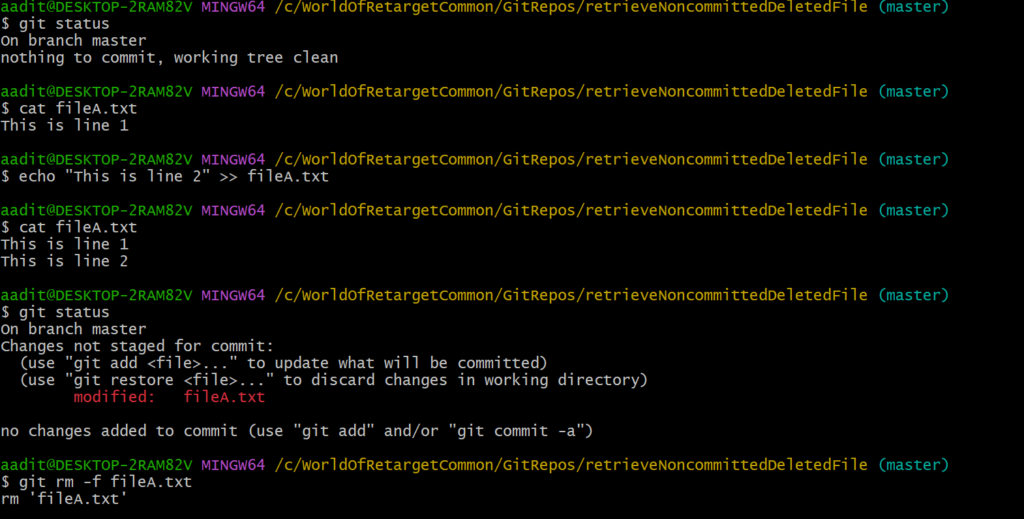
I have added a new line in the file and then deleted it. Let me try to recover it as done previously.
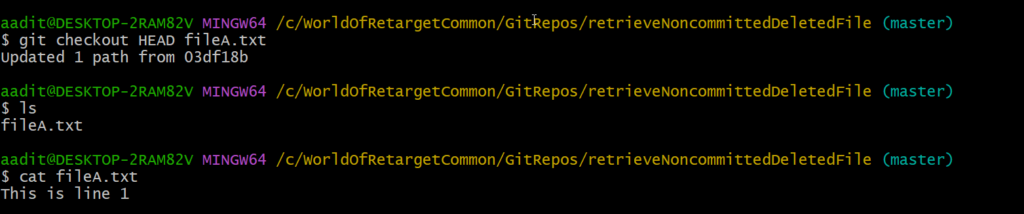
We got the file back but the content is exactly the same as we had at the last commit. Changes made after the last commit is gone. So we are retrieving the file from a stage.

Using the git command line, as far as I know, it is difficult to get changes back but if you are using IDE such as Eclipse, and IntelliJ then we can get the changes back using local history.

If you have any doubt, feel free to comment below.
If you like my posts, please like, comment, share and subscribe to my YouTube channel.
#ThanksForReading
#HappyLearning

Uncategorized

Post navigation

Previous Post: Protractor Tutorial 3 – Prerequisites To Learn Protractor
Next Post: TestNG Tutorials

Related Posts

January 7, 2018 – Make Selenium Easy Uncategorized
oauth 2.0 Uncategorized
Git Tutorial 26 – How To Ignore Already Indexed/staged/Committed/Pushed File to Git Repo Uncategorized
image – Make Selenium Easy Uncategorized
May 10, 2019 – Make Selenium Easy Uncategorized
Generics In Java Uncategorized

Recent Posts

  • How to Set Up Selenium WebDriver with Python Step by Step
  • How to Set Up Selenium WebDriver with Java from Scratch
  • What Is Selenium and Why It Is the Most Popular Test Automation Framework
  • Getting Started with Selenium 4: What Is New and How to Upgrade from Selenium 3
  • Manual Testing

Recent Comments

No comments to show.

Archives

  • April 2026
  • April 2025
  • March 2025
  • February 2025
  • January 2025
  • December 2024
  • November 2024
  • October 2024
  • September 2024
  • August 2024
  • April 2024
  • March 2024
  • February 2024
  • December 2023
  • October 2023
  • August 2023
  • November 2022
  • September 2022
  • August 2022
  • July 2022
  • May 2022
  • March 2022
  • October 2021
  • April 2021
  • March 2021
  • January 2021
  • December 2020
  • October 2020
  • September 2020
  • August 2020
  • June 2020
  • May 2020
  • April 2020
  • March 2020
  • February 2020
  • January 2020
  • December 2019
  • November 2019
  • October 2019
  • September 2019
  • August 2019
  • May 2019
  • December 2018
  • November 2018
  • October 2018
  • September 2018
  • August 2018
  • July 2018
  • January 2018

Categories

  • Getting Started
  • Uncategorized

Copyright © 2026 Make Selenium Easy.

Powered by PressBook Masonry Dark