Skip to content

Make Selenium Easy

And Keep It That Way

  • Home
  • Share
  • Toggle search form

Why And How Should We Terminate Browser Driver Executable File In Selenium WebDriver

Posted on 03/16/2025 By admin

Hello People,

Some days ago, I was running my regression automation suite and found webdriver is not able to launch browser. I was getting some socket exception. Whenever I face such situation, I just try to update browser version, browser driver version and selenium jar file version. Versioning non-compatibility is major issue in Selenium for not launching browser or URL.

When I downloaded “chromedriver.exe” and tried to replace with old one in folder. It was giving me exception that it can not be deleted as it is in use. But I was not running any scripts. I opened task manager and see there are so many instance which are up and running.
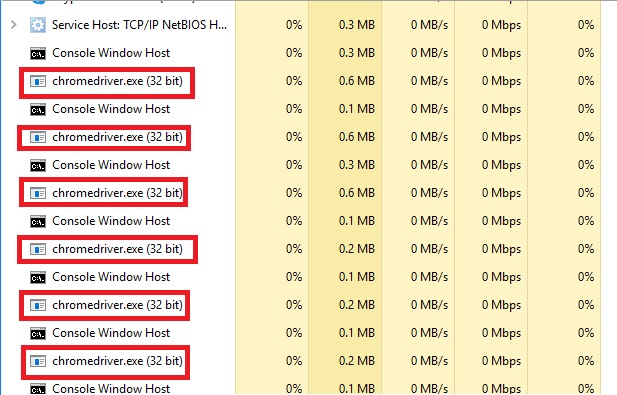
This is because we need to set a system property to launch any browser. Statement is as below:

System.setProperty(“webdriver.chrome.driver”,”./exefiles/chromedriver.exe”);

Because of above statement, system launches new executable file for each program run keeping older executable files in memory. It can reduce your system performance drastically.

So, it is good idea to terminate the execution of executable files once you are done. Now we will see how can we do that. We need to use below statement to kill executable file:

Runtime.getRuntime().exec(“taskkill /F /IM chromedriver.exe”);

If you have any doubt, feel free to comment below. If you like my posts, please like, comment, share and subscribe. #ThanksForReading

#HappySelenium

Uncategorized

Post navigation

Previous Post: access token
Next Post: TestNG Tutorials 48: How to Pass Parameters of Different Datatypes in TestNG

Related Posts

Amod Mahajan Uncategorized
fluentwait Uncategorized
FileNameInFileUpload – Make Selenium Easy Uncategorized
TestNG Tutorials 63: Dependency in TestNG – Usage of Regular Expressions with DependsOnGroup Uncategorized
Data Driven Testing in Postman Using CSV File Uncategorized
get Uncategorized

Recent Posts

  • Getting Started with Selenium 4: What Is New and How to Upgrade from Selenium 3
  • Manual Testing
  • Baby Steps To Become Efficient Selenium-Java Automation Tester
  • Features of Selenium 4.0.0 Release – Java Binding
  • Part 1: Handling Drop-down Created Using SELECT Tag In Selenium

Recent Comments

No comments to show.

Archives

  • April 2026
  • April 2025
  • March 2025
  • February 2025
  • January 2025
  • December 2024
  • November 2024
  • October 2024
  • September 2024
  • August 2024
  • April 2024
  • March 2024
  • February 2024
  • December 2023
  • October 2023
  • August 2023
  • November 2022
  • September 2022
  • August 2022
  • July 2022
  • May 2022
  • March 2022
  • October 2021
  • April 2021
  • March 2021
  • January 2021
  • December 2020
  • October 2020
  • September 2020
  • August 2020
  • June 2020
  • May 2020
  • April 2020
  • March 2020
  • February 2020
  • January 2020
  • December 2019
  • November 2019
  • October 2019
  • September 2019
  • August 2019
  • May 2019
  • December 2018
  • November 2018
  • October 2018
  • September 2018
  • August 2018
  • July 2018
  • January 2018

Categories

  • Getting Started
  • Uncategorized

Copyright © 2026 Make Selenium Easy.

Powered by PressBook Masonry Dark