Interface WebElement contains a method “getText()” whose return type is a String. If you refer official document of Selenium then you can find a clear crystal sentence stating what this method does :-
Get the visible (i.e. not hidden by CSS) innerText of this element, including sub-elements.
I did not understand the terms such as “not hidden by CSS“, “innerText“, “including sub-elements“.
Let’s forget getText() method for some time and research more on words quoted above.
This is a paragrah Hello Amod
Observe the rendered text between opening and closing nodes above. For example – “This is a paragraph” between opening node
and closing node
is an innerText. Similarly “Logout” and “Hello Amod” are innerTexts of button and span respectively.
In above example, “Sign In” is innerText of first “button” node while “Sign Up” is the innerText for second “button” and “Sign In Sign Up” is innerText of “p” node.
Now read the definition of getText() method again or observe bold text in below paragraph.
Get the visible (i.e. not hidden by CSS) innerText of this element, including sub-elements.
Is it making sense? Inner text of a node combines rendered text of all its children node as it appears. If I say that give me innerText of node first “button” then it will see there is no child node and returns only “Sign In”. Same case for second button tag. But if I ask you to give innerText of node “p” then it will see that “p” node has two children node and it will combine text from both nodes and return i.e. “Sign In Sign Up”.
This is a sample paragraph
What will be innerText for each node above? It will be :-
button - Sign In
button - Sign Up
p - Sign in Sign Up This is a sample paragraph
innerText of node p will be innerText of first button node + innerText of second button node + rendered text of node p.
Let’s not believe on my words. Let’s do some practicals.
Let’s create above shown html with ids as below:-
This is a sample paragraph
Now learn a new thing that “innerText” is a property of html element. That is the reason I used exactly “innerText” everywhere above and same in getText() description by Selenium WebDriver developer. So the innerText is the property of the HTMLElement interface represents the “rendered” text content of a node and its descendants.
Now write simple Javascript commands in Chrome console and observe output and find that whatever I said is correct.
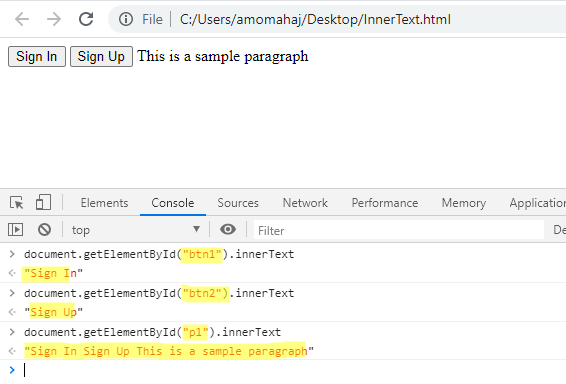
We just learnt that innerText of node is combined rendered text of all children nodes. But there is a twist. It ignores rendered text of and tags. It also ignores the text hidden by CSS. Let’s see an example below :-
There is a paragraph after style tag after script tag HIDDEN TEXT afte hidden
In above example there are and tags and also a span tag which is hidden using “display:none”. innerText will skip style and script tags and also span tag as it is hidden.
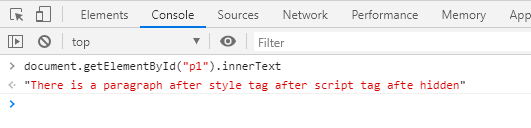
Hopefully you understand the term “not hidden by CSS” in description of getText().
Let’s write some Selenium codes :-
package BasicSeleniumConcepts;

import org.openqa.selenium.By;
import org.openqa.selenium.WebDriver;
import org.openqa.selenium.chrome.ChromeDriver;
import org.testng.annotations.Test;

import io.github.bonigarcia.wdm.WebDriverManager;

public class getTextExamples {

        @Test
        public void exampleInnerText1()
        {
                WebDriverManager.chromedriver().setup();
                WebDriver driver= new ChromeDriver();
                String fileURL = System.getProperty("user.dir");
                driver.get(fileURL + "/src/test/resources/htmlFiles/innerText.html");

                System.out.println("Output of Node Button 1 = " + driver.findElement(By.id("btn1")).getText());
                System.out.println("Output of Node Button 2 = " + driver.findElement(By.id("btn2")).getText());
                System.out.println("Output of Node P = " + driver.findElement(By.id("p1")).getText());

                driver.quit();
                System.out.println("********************************************************************");
        }

        @Test
        public void exampleInnerText2()
        {
                WebDriverManager.chromedriver().setup();
                WebDriver driver= new ChromeDriver();
                String fileURL = System.getProperty("user.dir");
                driver.get(fileURL + "/src/test/resources/htmlFiles/innerTextEx2.html");

                // Nothing will be returned by style tag as it ignored by getText
                System.out.println("Output of Node Style = " + driver.findElement(By.tagName("style")).getText());
                // Nothing will be returned by script tag as it ignored by getText
                System.out.println("Output of Node Script = " + driver.findElement(By.tagName("script")).getText());
                // Nothing will be returned by span tag as it is hidden
                System.out.println("Output of Span = " + driver.findElement(By.tagName("span")).getText());
                // Combine all rendered text of children nodes
                System.out.println("Output of P = " + driver.findElement(By.id("p1")).getText());

                driver.quit();
        }
}
Output of Node Button 1 = Sign In
Output of Node Button 2 = Sign Up
Output of Node P = Sign In Sign Up This is a sample paragraph
********************************************************************
Output of Node Style =
Output of Node Script =
Output of Span =
Output of P = There is a paragraph after style tag after script tag after hidden
Let’s learn extra.
What getText() method will return for a node which has no innerText?
Answer is an empty string i.e. a string with length Zero.
@Test
        public void exampleInnerText3()
        {
                WebDriverManager.chromedriver().setup();
                WebDriver driver= new ChromeDriver();
                String fileURL = System.getProperty("user.dir");
                driver.get(fileURL + "/src/test/resources/htmlFiles/EmptyAndWhiteSpace.html");

                String textReceived = driver.findElement(By.id("p1")).getText();
                System.out.println("Output of Node P = " + textReceived );
                System.out.println("Length of text received for P = "+ textReceived.length());
                driver.quit();
        }
Output of Node P =
Length of text received for P = 0
Will getText() method trim leading , trailing or white spaces in between? Will it give innerText which has multiple lines or
?
Answer is as it looks or appears on browser. I will show you an example where white spaces were provided normally and also using  .
 This is a line break statement. There is another line break
 in the statement.