In this post we will see an important and confusing topic – Difference between get() and navigate() methods. In fact this is not at all confusing as people just do not try to observe behavior by writing some lines of code and going through official documents.
Let me point down some differences which you people generally see :-
- get() method holds or waits till page is loaded while navigate() does not.
- get() method does not retain any browsing history while navigate() does.
In fact both above points are incorrect.
First of all navigate() method can not be used directly to load a URL. WebDriver interface has a method “navigate()” which returns a type Navigation which is an inner interface in WebDriver interface. Navigation interface is an abstraction allowing the driver to access the browser’s history by explicit methods and to navigate to a given URL.
This Navigation interface consists of below methods :-
// Move back a single "item" in the browser's history
void back();
// Move a single "item" forward in the browser's history. Does nothing if
we are on the latest page viewed.
void forward();
// Load a new web page in the current browser window. Similar to get() method
void to(String url);
// Overloaded version of to(String url) that makes it easy to pass in a URL
void to(URL url);
//Refresh the current page
void refresh();
Referring official document of Selenium is always good to learn valid points. It clearly says get() method is synonyms for to() method. It makes sense that both methods do the same thing.
It defines get() as :
” Load a new web page in the current browser window. This is done using an HTTP POST operation, and the method will block until the load is complete. Synonym for WebDriver.Navigation.to(String)
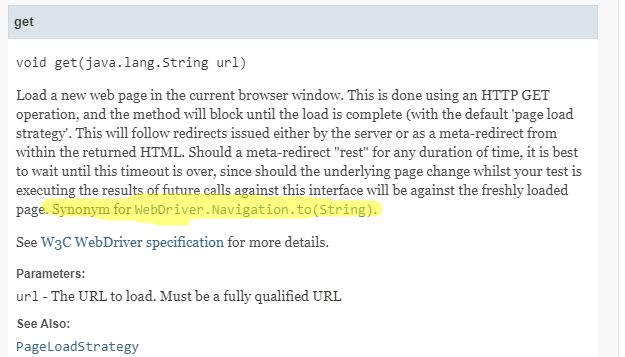
Let’s see how they define to() method:
“Load a new web page in the current browser window. This is done using an HTTP POST operation, and the method will block until the load is complete. “
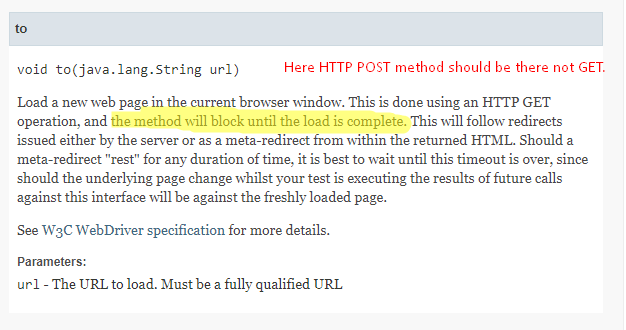
Note – You will see in above doc, Selenium developers have mentioned as “This is done using an HTTP GET” which is incorrect. It is actually a POST request. I have reported this typo. You can find that bug details here.
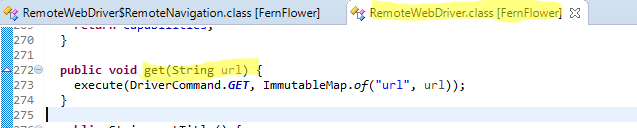
So hopefully you must have got the point that to() and get() are same. In fact to() calls get() method internally.
Go to RemoteWebDriver class of Selenium WebDriver and check implementation of get() method:
In the same class, there is an inner class called “RemoteNavigation” which implements Navigation interface. This class defines methods to(), refresh(), back() and forward(). Check implementation of to().
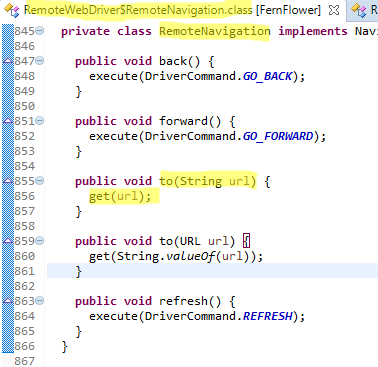
If still you are confused then some lines of codes will work for sure.
In below program, I am loading same website using get() and to() methods and keeping timer.
package com.automationpractice.testScripts;

import java.util.Date;

import org.openqa.selenium.WebDriver;
import org.openqa.selenium.chrome.ChromeDriver;

public class DemoTest {


        public static void main(String[] args) {

                System.setProperty("webdriver.chrome.driver", "G:\\MakeSeleniumEasy\\MakeSeleniumEasyHybridFramework\\exefiles\\chromedriver.exe");
                WebDriver driver = new ChromeDriver();

                // Using get() method
                System.out.println("Start Time :"+new Date());
                driver.get("http://makeseleniumeasy.com/");
                System.out.println("End Time :"+new Date());
                driver.quit();

                // Using to() method
                driver = new ChromeDriver();
                System.out.println("Start Time :"+new Date());
                driver.navigate().to("http://makeseleniumeasy.com/");
                System.out.println("End Time :"+new Date());
                driver.quit();

        }


}
Output:
Starting ChromeDriver 2.34.522940 (1a76f96f66e3ca7b8e57d503b4dd3bccfba87af1) on port 16407
Only local connections are allowed.
Feb 03, 2019 10:54:53 AM org.openqa.selenium.remote.ProtocolHandshake createSession
INFO: Detected dialect: OSS
Start Time :Sun Feb 03 10:54:53 IST 2019
End Time :Sun Feb 03 10:55:37 IST 2019
Starting ChromeDriver 2.34.522940 (1a76f96f66e3ca7b8e57d503b4dd3bccfba87af1) on port 37609
Only local connections are allowed.
Feb 03, 2019 10:55:52 AM org.openqa.selenium.remote.ProtocolHandshake createSession
INFO: Detected dialect: OSS
Start Time :Sun Feb 03 10:55:52 IST 2019
End Time :Sun Feb 03 10:56:39 IST 2019
You can see get() and to() both waited till page is loaded. But I am sad that my website loads slow. 🙁
Then question is still up that what is actual difference between get() and navigate(). Answer comes from official document again.
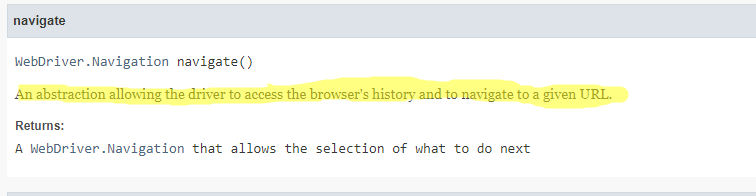
Since navigate has access on browser’s history, you can navigate back and forward as we do in a browser manually by clicking back and forward button. It also provides you to refresh the currently loaded page.
There is another interesting catch here. If you understand here that if a load a URL using to() method then only you can navigate back and forward, its NOT correct. I see people say that get() does not keep history while navigate() does. It is not like that.
Every URL loaded in browser will be in browser history and navigate allows to access that history. So below code will work absolutely fine:
driver.get("http://makeseleniumeasy.com/");
driver.get("https://www.google.com/");
driver.navigate().back();
Difference between get() and navigate():
- Return type of get() is void while return type of navigate() is a Navigation interface which allows you use other methods.
- Using navigate() you get direct methods of Navigation interface to access browsing history by using back() and forward() methods. You can navigate to a URL as well as you can refresh current window. Using get() it is not possible to go back and forward without passing URL explicitly.
- There is no difference in internal implementation of get() and to() as to() method calls get() method internally.
You can download/clone above sample project from here.
If you have any doubt, feel free to comment below.If you like my posts, please like, comment, share and subscribe.#ThanksForReading
#HappyLearning