As a part of End to End REST Assured Tutorial, in this post, we will learn about JSON Schema validation in Rest Assured.
In most of the tutorials, JSON schema validation in Rest Assured is shown for JSON response only or professionals understand that JSON schema validation can be done only for a JSON response. That is not correct. Any JSON can be validated against a related JSON schema.
I have used below dependency of Rest Assured library for this post:-
io.rest-assured rest-assured 4.3.1 test
If you are not aware of JSON Schema, learn about that here.
Rest Assured provides support to JSON schema validation since 2.1.0 version. But to use this feature we need to add another Java library “json-schema-validator” in our project classpath. Since I am using a maven project I will add the below dependency in pom.xml:-
io.rest-assured json-schema-validator 4.3.1
Be careful when you search the above dependency in Maven central repo as there are multiple libraries with the same name. Make sure you look groupId as “io.rest-assured“. You can also quickly find by seeing Rest Assured official logo. If you are using non-maven project then you can download JAR file and add to classpath.
You should also add the same version of json-schema-validator as of Rest assured (4.3.1 is this case).
JsonSchemaValidator class provides multiple overloaded static methods to perform JSON schema validation.
public static JsonSchemaValidator matchesJsonSchemaInClasspath(String pathToSchemaInClasspath) – Creates a Hamcrest matcher that validates that a JSON document conforms to the JSON schema provided to this method.
public static JsonSchemaValidator matchesJsonSchema(File file) – Creates a Hamcrest matcher that validates that a JSON document conforms to the JSON schema provided to this method.
If you keep JSON Schema files in the resource folder of your project or src/test/resources of a maven project then you can use matchesJsonSchemaInClasspath() method directly as you just need to pass the name of the JSON schema file. If you store JSON schema files at different locations within the project or outside the project then you can use the overloaded method matchesJsonSchema().
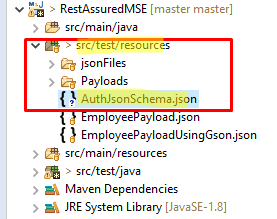
I will use the same JSON Schema shown in this post. This JSON schema is generated for Restful Booker – Auth API. Let’s save below JSON schema under src/test/resources folder.
AuthJsonSchema.json
{
    "$schema": "http://json-schema.org/draft-07/schema",
    "$id": "http://example.com/example.json",
    "type": "object",
    "title": "The root schema",
    "description": "The root schema comprises the entire JSON document.",
    "default": {},
    "examples": [
        {
            "token": "abc123"
        }
    ],
    "required": [
        "token"
    ],
    "properties": {
        "token": {
            "$id": "#/properties/token",
            "type": "string",
            "title": "The token schema",
            "description": "An explanation about the purpose of this instance.",
            "default": "",
            "examples": [
                "abc123"
            ]
        }
    },
    "additionalProperties": true
}
We can directly call schema validator methods in an overloaded body(Matcher matcher) method. You may be thinking the return type of JSON Schema validator methods is JsonSchemaValidator so how can we pass them to body(Matcher matcher) method. This is because of multilevel inheritance. Class JsonSchemaValidator implements Interface Matcher indirectly.
package JsonSchema;

import org.hamcrest.Matchers;
import org.testng.annotations.Test;

import io.restassured.RestAssured;
import io.restassured.http.ContentType;
import io.restassured.module.jsv.JsonSchemaValidator;

public class VerifyJsonSchema {

        @Test
        public void verifyJsonSchema() {

                String jsonStringPayload = "{\"username\" : \"admin\",\"password\" : \"password123\"}";

                // GIVEN
                RestAssured
                        .given()
                                .baseUri("https://restful-booker.herokuapp.com/auth")
                                .contentType(ContentType.JSON)
                                .body(jsonStringPayload)
                // WHEN
                        .when()
                                .post()
                // THEN
                        .then()
                                .assertThat()
                                .statusCode(200)
                                .body("token", Matchers.notNullValue())
                                .body(JsonSchemaValidator.matchesJsonSchemaInClasspath("AuthJsonSchema.json"));
        }

}
The above test will pass. Let’s make some changes to the expected JSON schema to fail validation and understand the error messages.
As of now, we get only one property “token” in response. Let’s add a new property under the “required” section of JSON schema.
{
    "$schema": "http://json-schema.org/draft-07/schema",
    "$id": "http://example.com/example.json",
    "type": "object",
    "title": "The root schema",
    "description": "The root schema comprises the entire JSON document.",
    "default": {},
    "examples": [
        {
            "token": "abc123"
        }
    ],
    "required": [
        "token",
        "nonExistingProperty"
    ],
    "properties": {
        "token": {
            "$id": "#/properties/token",
            "type": "string",
            "title": "The token schema",
            "description": "An explanation about the purpose of this instance.",
            "default": "",
            "examples": [
                "abc123"
            ]
        }
    },
    "additionalProperties": true
}
Run the above Rest Assured test and you will get console error as:-
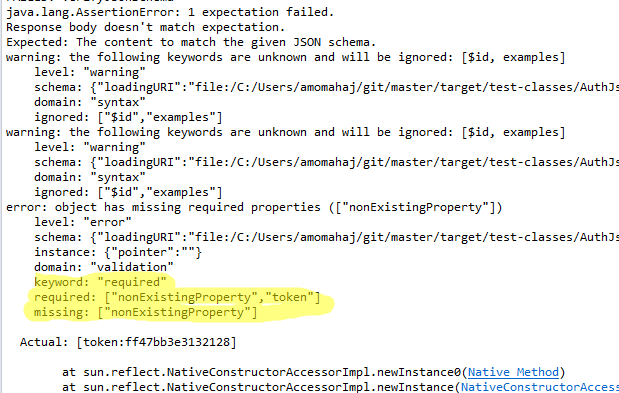
You can see clearly that the log shows that a required field is missing.
Property “key” holds a String value. Let’s change it to integer and observe the output.
{
    "$schema": "http://json-schema.org/draft-07/schema",
    "$id": "http://example.com/example.json",
    "type": "object",
    "title": "The root schema",
    "description": "The root schema comprises the entire JSON document.",
    "default": {},
    "examples": [
        {
            "token": "abc123"
        }
    ],
    "required": [
        "token"
    ],
    "properties": {
        "token": {
            "$id": "#/properties/token",
            "type": "integer",
            "title": "The token schema",
            "description": "An explanation about the purpose of this instance.",
            "default": "",
            "examples": [
                "abc123"
            ]
        }
    },
    "additionalProperties": true
}
Run the same Rest Assured test again and you will get the output as below:-
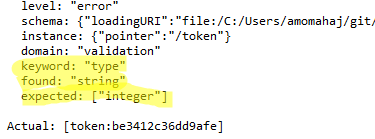
You can see that it validates that a string value is found instead of an integer.
Above are just some examples of validation types. We can do a lot using this feature.
Above we kept JSON schema file within src/test/resources folder and used matchesJsonSchemaInClasspath() method. We can not use this method if we do not have JSON schema in the resource folder. You will get IllegalArgumentException stating Schema to use cannot be null.
Note – I have mentioned src/test/resources to keep schema files. In fact, you can keep them in src/main/resources folder as well. Your Test classes can also be in any src/main/java or src/test/java but tests should be kept under src/test/java as a standard practice. Make sure you remove tag from maven dependency in pom.xml .
In that case, we can use another overloaded static method matchesJsonSchema() where you can pass a complete path of JSON Schema.
package JsonSchema;

import java.io.File;

import org.hamcrest.Matchers;
import org.testng.annotations.Test;

import io.restassured.RestAssured;
import io.restassured.http.ContentType;
import io.restassured.module.jsv.JsonSchemaValidator;

public class VerifyJsonSchemaNonResource {

        @Test
        public void verifyJsonSchema() {

                String jsonStringPayload = "{\"username\" : \"admin\",\"password\" : \"password123\"}";

                // GIVEN
                RestAssured
                        .given()
                                .baseUri("https://restful-booker.herokuapp.com/auth")
                                .contentType(ContentType.JSON)
                                .body(jsonStringPayload)
                // WHEN
                        .when()
                                .post()
                // THEN
                        .then()
                                .assertThat()
                                .statusCode(200)
                                .body("token", Matchers.notNullValue())
                                .body(JsonSchemaValidator.matchesJsonSchema(new File("C:\\Users\\amomahaj\\git\\master\\src\\test\\java\\JsonSchema\\schema.json")));
        }

}
Remember that you need to pass the file path using a File object. Do not directly give file path as String. The method matchesJsonSchema() expects JSON schema as a string not a file path as String.
- We need to add another Java library “json-schema-validator” in our project classpath to perform JSON schema validation.
- Class JsonSchemaValidator provides static overloaded methods matchesJsonSchema() and matchesJsonSchemaInClasspath() to validate JSON schema.
- If we keep the expected JSON schema JSON file in the resource section then use matchesJsonSchemaInClasspath() method. You can use matchesJsonSchema() method as well.
- If we do not keep the expected JSON schema JSON file in the resource section then use matchesJsonSchema() method.
You can download/clone the above sample project from here.
You can subscribe to my YouTube channel RetargetCommon to learn from video tutorials.
If you have any doubt, feel free to comment below.If you like my posts, please like, comment, share and subscribe.#ThanksForReading
#HappyLearning