As a part of End to End REST Assured Tutorial, in this post, we will parse a JSON as JsonNode to fetch values of different types.
Creating POJO classes for parsing a JSON to fetch values may not be easy all the time especially when you have lengthy nested JSON. Instead, we can use the tree structure of a JSON.
Since we are using Jackson API of Java for this example, make sure you have the latest dependency of Jackson Databind in your project classpath. I have used below Jackson dependency for this post:-
     com.fasterxml.jackson.core
     jackson-databind
     2.11.1
{
  "firstName": "Amod",
  "lastName": "Mahajan",
  "married": false,
  "salary": 2000.54,
  "addressPin": 45324
}
You can use this site to view the tree representation of a JSON. A tree representation of the above example JSON will look as below:-
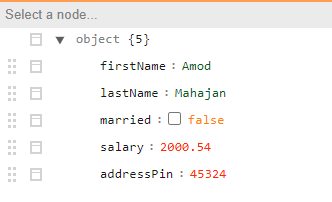
A tree structure helps you to navigate to a node easily.
We need to use class ObjectMapper provided by Jackson API. ObjectMapper class provides a method “readTree()” which is responsible to deserialize JSON content as tree expressed using a set of JsonNode instances.
We can get the value of a node using get() and path() methods of JsonNode class. We need to extract value with appropriate data types after using get() and path() methods.
package JsonNodeJackson;

import org.testng.annotations.Test;

import com.fasterxml.jackson.core.JsonProcessingException;
import com.fasterxml.jackson.databind.JsonMappingException;
import com.fasterxml.jackson.databind.JsonNode;
import com.fasterxml.jackson.databind.ObjectMapper;

public class ParseJsonObjectToReadValues {

        @Test
        public void parseJsonObjectToReadValues() throws JsonMappingException, JsonProcessingException
        {
                String jsonObject = "{\r\n" +
                                "  \"firstName\": \"Amod\",\r\n" +
                                "  \"lastName\": \"Mahajan\",\r\n" +
                                "  \"married\": false,\r\n" +
                                "  \"salary\": 2000.54,\r\n" +
                                "  \"addressPin\": 45324\r\n" +
                                "}";
                // Creating an instance of ObjectMapper class
                ObjectMapper objectMapper = new ObjectMapper();
                // Get tree representation of json
                JsonNode jsonTree = objectMapper.readTree(jsonObject);
                // Get value of firstName as string
                String firstName = jsonTree.get("firstName").asText();
                String lastName = jsonTree.get("lastName").asText();
                // Get value of married as boolean
                boolean married = jsonTree.get("married").asBoolean();
                double salary = jsonTree.get("salary").asDouble();
                long addressPin = jsonTree.get("addressPin").asLong();

                System.out.println("FirstName is : "+firstName);
                System.out.println("LastName is  : "+lastName);
                System.out.println("Married is   : "+married);
                System.out.println("Salary is    : "+salary);
                System.out.println("Addresspin is: "+addressPin);

        }

}
FirstName is : Amod
LastName is  : Mahajan
Married is   : false
Salary is    : 2000.54
Addresspin is: 45324
Observe above that I used asText(), asBoolean() methods to parse value appropriately. If you are not sure what type of value is held by node then you can use methods like isTextual(), isBoolean(), etc.
System.out.println(jsonTree.get("firstName").isTextual());
System.out.println(jsonTree.get("lastName").isTextual());
System.out.println(jsonTree.get("married").isBoolean());
System.out.println(jsonTree.get("salary").isDouble());
System.out.println(jsonTree.get("addressPin").isLong());
You will not get an exception if you are not parsing to correct data types. For example – If you parse a string to boolean using asBoolean() then it works as below as per offical Java doc of Jackson API:-
Method that will try to convert value of this node to a Java boolean. JSON booleans map naturally; integer numbers other than 0 map to true, and 0 maps to false and Strings ‘true’ and ‘false’ map to corresponding values. If representation cannot be converted to a boolean value (including structured types like Objects and Arrays), default value of false will be returned; no exceptions are thrown.
Similarly for asLong():-
Method that will try to convert value of this node to a Java long. Numbers are coerced using default Java rules; booleans convert to 0 (false) and 1 (true), and Strings are parsed using default Java language integer parsing rules. If representation cannot be converted to an long (including structured types like Objects and Arrays), default value of 0 will be returned; no exceptions are thrown.
When you are trying to retrieve a value method for a node that doesn’t exist using get() then you will get NullPointerException.
// Retrieving value of non-existing key
System.out.println(jsonTree.get("nonExistingNode").asText());
You can use overloaded methods such as asText(String defaultValue), asInt(int defaultValue) to handle these unexpected null values. These methods will handle if a node has explicit value as null. But to use these methods you need to use an alternative of get() method called path() method. With get() if you use above methods then also you will get NullPointerException.
As per the official doc – path() method is similar to get(String), except that instead of returning null if no such value exists (due to this node not being an object, or object not having value for the specified field), a “missing node” will be returned. This allows for convenient and safe chained access via path calls.
// Retrieving value of non-existing key
                String s = jsonTree.get("nonExistingNode").asText("Default Value");
                System.out.println(s);
The output will be a NullPointerException.
// Retrieving value of non-existing key using path
                String s1 = jsonTree.path("nonExistingNode").asText("Default value");
                System.out.println(s1);
The Output will be “Default value”.
You can download/clone the above sample project from here.
If you have any doubt, feel free to comment below.If you like my posts, please like, comment, share and subscribe.#ThanksForReading
#HappyLearning