In last post, we have already seen Parsing of JSON Object in Postman. You can get API response in JSON Array as well. A JSON Array is an ordered list of values. If JSON response are enclosed within [ ], it is called a JSON Array. If JSON response is enclosed in { }, is called a JSON Object.
You can get a JSON response which contains both JSON Object and JSON Array. You may also get nested JSON Object and Array.
JSON Array Example:-
[
    {
        "bookingid": 8
    },
    {
        "bookingid": 12
    },
    {
        "bookingid": 13
    },
    {
        "bookingid": 14
    },
    {
        "bookingid": 5
    },
    {
        "bookingid": 15
    },
    {
        "bookingid": 4
    },
    {
        "bookingid": 2
    }
]
Index in JSON Array starts from zero and we can iterate it in similar way we iterate an Array in any programming language.
When we hit Booking – GetBookingIds API of RestFul-booker , It gives a JSON Array which contains a list of JSON Objects. Response is similar to what I have given in example above.
When we parse response using pm.response.json() , It automatically gives you data either in JSON Object or JSON Array as returned response. That means if response is in JSON Object, it will parse it as JSON Object and if response is in JSON Array, it will parse it as JSON Array. Actually variables in JavaScript is loosely coupled so you no need to specify exact type of data.
Suppose you parse response as: –
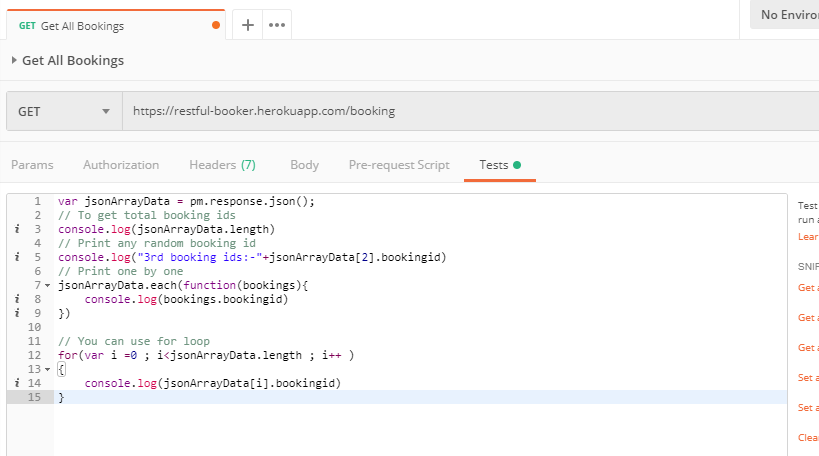
var jsonArrayData = pm.response.json();
To get array length:- jsonArrayData.length
To get value at specific index: – jsonArrayData[index]
If particular index returns a JSON Object, you need to use concepts discussed in previous post. For example as per above JSON Array , it returns a JSON Object which has field named “bookingid”. So to retrieve bookingid at index 2, we need to write code as :- jsonArrayData[2].bookingid
You can also iterate over JSON Array using each() and for loop:-
// Print one by one
jsonArrayData.each(function(bookings){ console.log(bookings.bookingid)
}) // You can use for loop
for(var i =0 ; i
You can import above example collection link from here: -
https://www.getpostman.com/collections/9ea3d6601eaa19e4d2df
Refer basics of API Testing here.
Refer detailed tutorial of Postman here.
More about API Testing in upcoming posts. Stay tuned.
If you have any doubt, feel free to comment below.If you like my posts, please like, comment, share and subscribe.#ThanksForReading
#HappyApiTesting