This is a frequently asked interview question of Java because people always gets confused with these terms and used interchangeably. I will try to explain these terms in easy words.
There are three stages for writing a code in any programming language – Development , Compilation and Execution. In Java programming language, there are three major components –
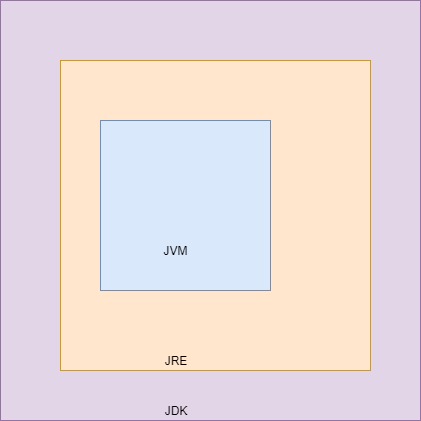
JVM is an internal part of JRE and JRE is an internal part of JDK. If you want to develop and execute a Java program – You need JDK. When we say JDK, it means you indirectly required JRE and JVM. You want to just execute a java program – You need only JRE.
- It is an abstract (Virtual) machine which loads, verifies, and executes bytecode (.class file).
- After compiling a .java file, we gets .class file that is called bytecode.
- JVM converts this bytecode to machine readable code based on platform.
- This is the reason JVM is platform dependent which makes Java a platform independent language.
- It contains many blocks – Class Loader, Memory Areas, Execution Engine Interpreter and JIT compiler.
- The JVM is called a virtual machine because the JVM definition defines an abstract machine. This includes registers, stack, etc, and the byte code that Java source is compiled to is practically machine code for this virtual machine. The JVM then interprets or compiles this bytecode into native machine instructions.
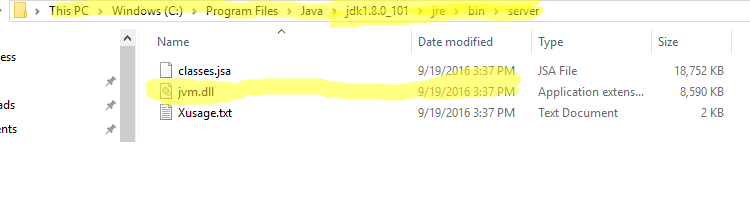
- We can find JVM as .dll file( in windows) and .so(in Linux) . Below is screenshot of JVM in windows:
- It resides inside JRE.
- It consists of JVM and many software packages (Supported classes to run Java programs, Property files etc.) which help JVM to perform its tasks.
- JRE is available outside of JDK as well. If you just want to execute .class file, you need JRE only.
- JRE is responsible for providing a runtime environment only. This is the reason it does not contain any development tools like compiler and debugger.
- JRE is platform dependent which makes Java a platform independent language.
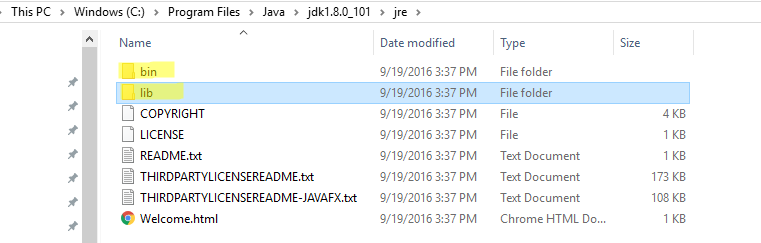
- In below image, you can see JRE contains bin ( JVM ) and supported libs.
- JDK consists of development tools and run time environment (JRE).
- If you want to develop and run a java program, you need a JDK.
- It is a kit or complete package to develop, compile and execute a Java program. It means that it contains JRE and JRE contains JVM. This is the reason it is called as a Kit.
- It is also platform dependent which makes Java a platform independent language.
- When we download JDK, you can see it consists JRE in it .
Below image will give you better understanding:
Hope, it will be easy for you now to differentiate among JVM, JRE and JDK. I will suggest you to remember in same flow i.e. JVM, JRE and JDK.
In case of any doubt, suggestion or you find some mistake, feel free to let me know in comments.
#ThanksForReading
#DonateIfYouThinkMyPostsHelpYou