As a part of GIT Tutorials End To End, we will learn to ignore already Indexed/staged/Committed/Pushed File to Git Repo using the .gitignore file in this post.
I will expect that you are aware of the basic concepts and commands of GIT. But if you are a beginner in GIT then I strongly recommend you to refer GIT Basic Commands and Concepts section on my blog first.
Did you know that I have started a YouTube channel as well and I need your support to make it successful. Please do watch content then comment, like, share, and obviously subscribe.
If you are now aware of the .gitignore file or how to create it then you must go through this post – Ignore Files Using the .gitignore
To learn basic patterns used in the .gitignore file refer to Important Pattern Formats For The .Gitignore File.
We create multiple files during the development of the project which are staged, committed and pushed to the remote repository. There might be scenarios in which you may need to remove some already staged and committed files and add them to the .gitignore file. If a file is not already staged or committed then we can simply add a pattern to ignore the file in the .gitignore file. But if the file is already indexed or committed then it is not a straightforward process.
Let’s create a local git repository with .gitignore to practice –

I will create a file and index/stage it first below-
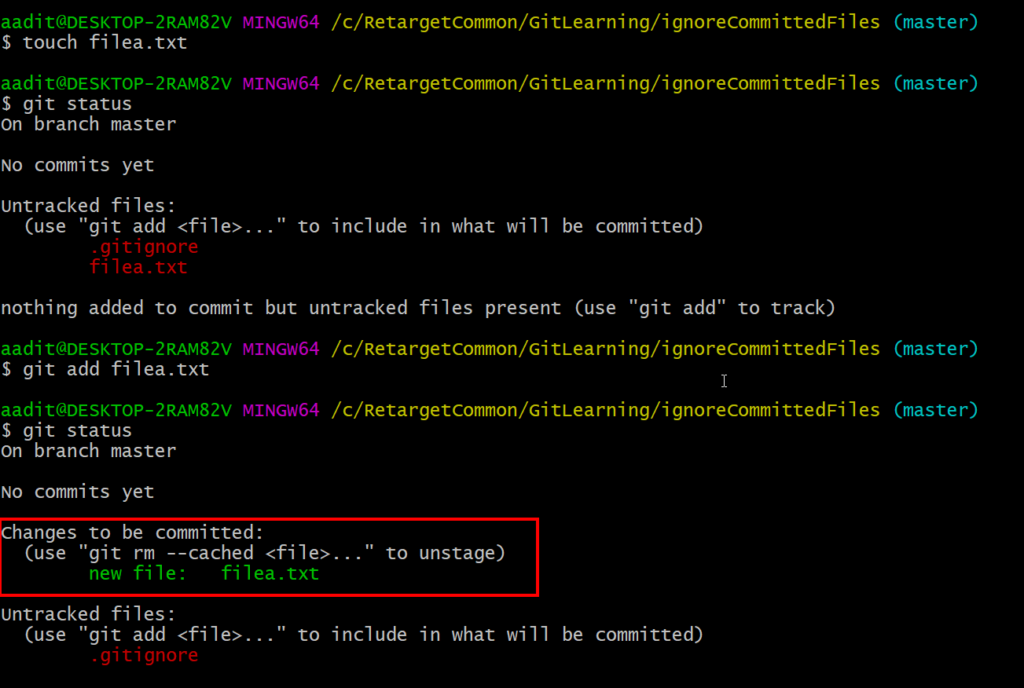
As you can see above that I have staged or indexed filea.txt using git add command. Now I want GIT to ignore this file. If we add the pattern to ignore filea.txt in the .gitignore file now it will not work i.e. not ignored as the file was already indexed.

So to ignore the already staged file we need to go the extra step. First, we need to Unstage the file from the stage. To unstage a file we need to use the git rm command. Once we unstage the file, add the pattern to the .gitignore file to ignore it. I have already added the filea.txt in the .gitignore file above so I will just run the git rm command to unstage the file.

As you can see above filea.txt is no more shown as changes to be committed and is also ignored by git.
The same step needs to follow if the file is already pushed to the remote. After these steps, you need to add, commit and push to reflect changes.
If you have any doubt, feel free to comment below.
If you like my posts, please like, comment, share and subscribe to my YouTube channel.
#ThanksForReading
#HappyLearning