Skip to content

Make Selenium Easy

And Keep It That Way

  • Home
  • Share
  • Toggle search form

Advanced TestNG Tutorials 34: How To Pass a Group Name to be Run at Runtime in TestNG XML Using Beanshell

Posted on 03/21/2025 By admin

Hello Folks,

In last post, we have seen how integration of beanshell and TestNg can help us to achieve “AND” and “OR” conditions with group names to be executed.

Problem statement:

You have created so many test methods with different groups. You do not need to run all group every time. You need to include or exclude groups as per requirements. You need to add include or exclude tags in testng xml which is not easier always. It will be even more difficult for a beginner or a business analyst or people with less technical knowledge to update testng xml to run.

Problem Solution:

WIll it not be good if you can pass group names at run time and no need to change anything in testng xml? Yes, its possible using beanshell.

TestNG class:

;

Create your testng.xml as below:

“groupToRun” is a VM arguments which we can pass through run configuration. Beanshell script will read it at run time and will execute group which we pass.

Passing VM arguments in Run configurations:

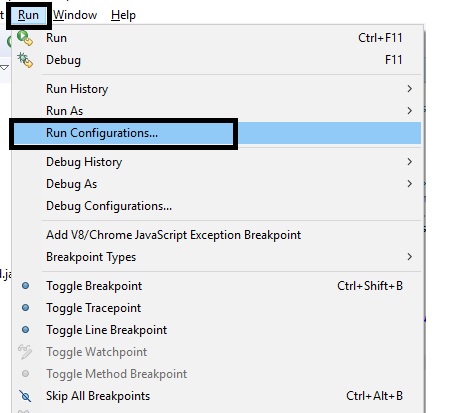
Navigate to Run -> Run Configurations:
Select testng xml for which arguments need to be passed:
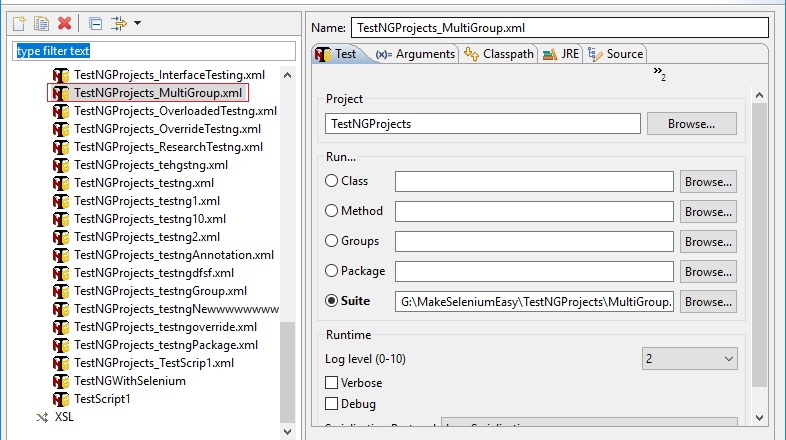
Click or Arguments tab and type in VM arguments as -DgroupToRun=:

Please note arguments name should be same as testng xml i.e. groupToRun. Now click on apply and run. 

You can see method which belongs to group “Window” runs.

This way is easier than updating testng xml everytime. Hope you learnt new thing today.

In next post, we will see how can we pass multiple group names as VM argument and what needs to be updated in testng xml.

More about TestNG in upcoming posts. Stay tuned.

If you have any doubt, feel free to comment below. If you like my posts, please like, comment, share and subscribe. #ThanksForReading

#HappySelenium

Uncategorized

Post navigation

Previous Post: getAttribute() method in Selenium WebDriver – Why, What and How to use?
Next Post: REST Assured Tutorial 49 – How To Retrieve Single and MultiValue Headers From Response Using Rest Assured

Related Posts

October 4, 2018 – Make Selenium Easy Uncategorized
image – Make Selenium Easy Uncategorized
April 13, 2017 – Make Selenium Easy Uncategorized
Java Programs | Make Selenium Easy Uncategorized
image – Make Selenium Easy Uncategorized
April 5, 2017 – Make Selenium Easy Uncategorized

Recent Posts

  • Getting Started with Selenium 4: What Is New and How to Upgrade from Selenium 3
  • Manual Testing
  • Baby Steps To Become Efficient Selenium-Java Automation Tester
  • Features of Selenium 4.0.0 Release – Java Binding
  • Part 1: Handling Drop-down Created Using SELECT Tag In Selenium

Recent Comments

No comments to show.

Archives

  • April 2026
  • April 2025
  • March 2025
  • February 2025
  • January 2025
  • December 2024
  • November 2024
  • October 2024
  • September 2024
  • August 2024
  • April 2024
  • March 2024
  • February 2024
  • December 2023
  • October 2023
  • August 2023
  • November 2022
  • September 2022
  • August 2022
  • July 2022
  • May 2022
  • March 2022
  • October 2021
  • April 2021
  • March 2021
  • January 2021
  • December 2020
  • October 2020
  • September 2020
  • August 2020
  • June 2020
  • May 2020
  • April 2020
  • March 2020
  • February 2020
  • January 2020
  • December 2019
  • November 2019
  • October 2019
  • September 2019
  • August 2019
  • May 2019
  • December 2018
  • November 2018
  • October 2018
  • September 2018
  • August 2018
  • July 2018
  • January 2018

Categories

  • Getting Started
  • Uncategorized

Copyright © 2026 Make Selenium Easy.

Powered by PressBook Masonry Dark