Skip to content

Make Selenium Easy

And Keep It That Way

  • Home
  • Share
  • About Us
  • Toggle search form

Protractor Tutorial 5 – Introduction & Installation of NodeJS

Posted on 02/19/2025 By admin

NodeJS official website defines it as:-

Node.js is a JavaScript runtime built on Chrome’s V8 JavaScript engine. Let me make it little simple for you.

NodeJS is an open source JavaScript based framework which is dynamic, cross-platform , asynchronous(Non-blocking APIs) and highly scalable runtime environment. It was developed by Ryan Dahl in 2009. It is used to run JavaScript code at server side. It means you can run JavaScript code outside a browser using NodeJS environment. It helps to create dynamic web pages.

NodeJS comes with the package manager called NPM (Node Package Manager) which makes it easier for programmers to publish and share source code of Node.js libraries. We can also install, uninstall and update any NodeJS libraries in easy ways using commands.

Why does Protractor need NodeJS?

Protractor is built as a wrapper on WebDriverJS which is JavaScript binding for WebDriver API. WebDriverJS uses NodeJS as a running environment to run JavaScript files. So indirectly Protractor also requires NodeJS. We can say Protractor is a NodeJS program.

If you want to use Selenium with Java binding, you need to install Java first. Same way here since Protractor is a NodeJS program, you need to install NodeJS first.

It is as simple as any normal software installation.

  1. Navigate to NodeJS official website.
  2. It will automatically detect your system details and will show NodeJS installer to download.
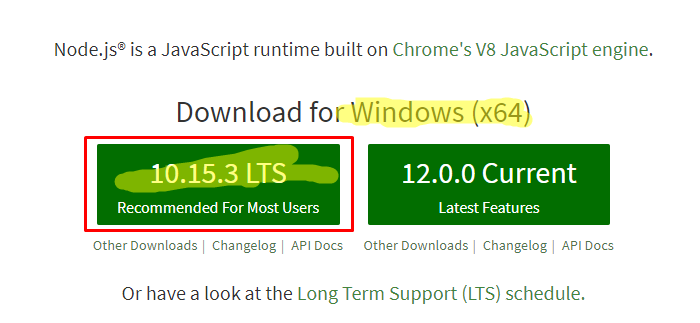
3. Download LTS version ( Long Time Support). For windows it will download a .msi file.

4. Double click on it and install it by following through screens.

5. Once you are done, run below command in terminal.

node -v or node –version
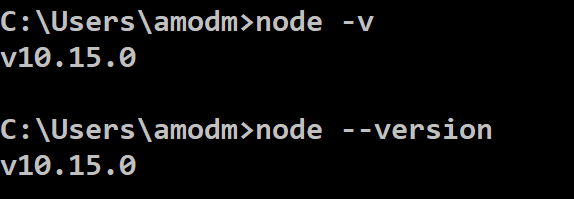
Above output verifies that you have successfully installed NodeJS. 

More on Protractor in upcoming posts. Stay tuned and keep learning with me.

#ThanksForReading

Uncategorized

Post navigation

Previous Post: REST Assured Tutorial 41 – Ignore unknown properties during deserialization Using @JsonIgnoreProperties
Next Post: Frequently Asked Java Program 22: Java Program to Trim Whitespace From String Without Using Trim Method

Related Posts

June 1, 2017 – Make Selenium Easy Uncategorized
October 22, 2017 – Make Selenium Easy Uncategorized
JAVA Topics Uncategorized
DataTypeMismatch – Make Selenium Easy Uncategorized
Creating Object Repository In Selenium WebDriver Without Using Any External Data Source Uncategorized
November 25, 2018 – Make Selenium Easy Uncategorized

Recent Posts

  • How to Set Up Selenium WebDriver with Python Step by Step
  • How to Set Up Selenium WebDriver with Java from Scratch
  • What Is Selenium and Why It Is the Most Popular Test Automation Framework
  • Getting Started with Selenium 4: What Is New and How to Upgrade from Selenium 3
  • Manual Testing

Recent Comments

No comments to show.

Archives

  • April 2026
  • April 2025
  • March 2025
  • February 2025
  • January 2025
  • December 2024
  • November 2024
  • October 2024
  • September 2024
  • August 2024
  • April 2024
  • March 2024
  • February 2024
  • December 2023
  • October 2023
  • August 2023
  • November 2022
  • September 2022
  • August 2022
  • July 2022
  • May 2022
  • March 2022
  • October 2021
  • April 2021
  • March 2021
  • January 2021
  • December 2020
  • October 2020
  • September 2020
  • August 2020
  • June 2020
  • May 2020
  • April 2020
  • March 2020
  • February 2020
  • January 2020
  • December 2019
  • November 2019
  • October 2019
  • September 2019
  • August 2019
  • May 2019
  • December 2018
  • November 2018
  • October 2018
  • September 2018
  • August 2018
  • July 2018
  • January 2018

Categories

  • Getting Started
  • Uncategorized

Copyright © 2026 Make Selenium Easy.

Powered by PressBook Masonry Dark